Research Guide
Research is Katbot's AI-powered token discovery system. Rather than manually curating tokens, it uses a dedicated AI agent to scan live market data and propose a ranked token set that feeds directly into your portfolio.
The Agentic Workflow
Research is the second stage in Katbot's four-stage agentic workflow:
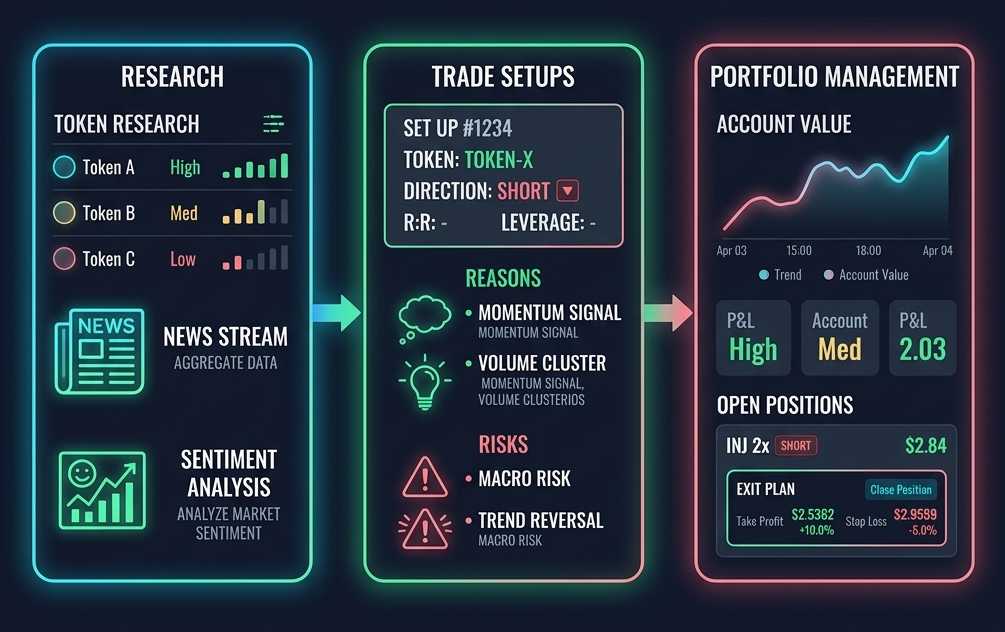
- [SETUP] Create an AI agent with a custom system prompt and assign it to a portfolio. See Agents and Portfolios.
- [RESEARCH] Use the Research tab to run an AI research agent that analyzes market data across specialized signal buckets and proposes a curated token set. (You are here.)
- [TRADE] Ask your agent to generate trade setups from the research-selected tokens. Review recommended entries and execute. See Recommendations.
- [MONITOR] Monitor open positions, track P&L, and close positions manually when needed. See Portfolios.
Data Sources
Katbot aggregates data from multiple sources to power its AI analysis:
- Hyperliquid — perpetual prices, funding rates, open interest, 24h volumes (hourly refresh)
- Kraken — spot OHLCV price data for ~80 trading pairs (hourly refresh)
- CoinGecko — token metadata, market capitalisation rankings (top 500 coins, daily refresh)
- The Graph — on-chain DEX activity on Arbitrum (Uniswap v3)
Where Research Lives
Research configuration and execution are split across two pages:
- Agent Detail Page → Research Configs tab — Create, edit, delete, and activate research configurations (bucket + methodology prompt + model). Configs belong to the agent, not the portfolio. See Agents → Research Configs.
- Portfolio Detail → Research tab — Run research using the active config from the portfolio's assigned agent, view results, and apply proposed tokens to the portfolio.
Research Buckets
Katbot provides specialized signal buckets, each designed to analyze a different market dimension:
| Bucket | Display Name | What it Analyzes |
|---|---|---|
NEW_LISTINGS |
New Listings | Recently added perpetuals on Hyperliquid |
MOMENTUM |
Momentum | Strong directional price movement across multiple timeframes |
TRENDING_SOCIAL |
Trending Social | Tokens gaining attention on social media and news |
FUNDING_RATE_ANOMALY |
Funding Rate Anomaly | Unusually high or low funding rates indicating overcrowded positioning |
VOLUME_BREAKOUT |
Volume Breakout | Volume spiking relative to recent rolling average |
WHALE_ACTIVITY |
Whale Activity | Large position changes or whale wallet movements |
SECTOR_ROTATION |
Sector Rotation | Hot/cold sector identification across L1, DeFi, AI, and more |
CORRELATION_DIVERGENCE |
Correlation Divergence | Tokens decoupling from BTC/ETH correlation patterns |
LIQUIDATION_CLUSTERS |
Liquidation Clusters | Concentrated liquidation risk levels on the exchange |
Note: Only one config can be active per agent (server-enforced).
Creating a Research Config
Research configs are created on the Agent, not the portfolio.
- Navigate to the Agent Detail Page for the agent you want to configure.
- Click the Research Configs tab (the second tab).
- Click Create Config.
- Select a bucket from the dropdown.
- Write a methodology prompt (10–5,000 characters) describing your research criteria.
- (Optional) Pick an LLM model from the dropdown (filtered to your plan's allowed models).
- (Optional) Toggle Set as Active to make this the default config for research runs.
- Click Create Config.
Note: Only one config can be active per agent. Activating a new config automatically deactivates the previous one.
Using Prompt Templates
Each bucket has a built-in prompt template to get you started:
- Create a new config or edit an existing one in the Agent Detail Page.
- Click Suggest prompt — a bucket-specific template is proposed.
- Review and customize the suggested prompt.
- Click Use This Prompt to populate the methodology field.
Running Research
Research runs are triggered from the Portfolio Detail → Research tab. The portfolio uses the active config from its primary assigned agent. If no agent is assigned or the agent has no active research config, a prompt will direct you to configure one on the agent first.
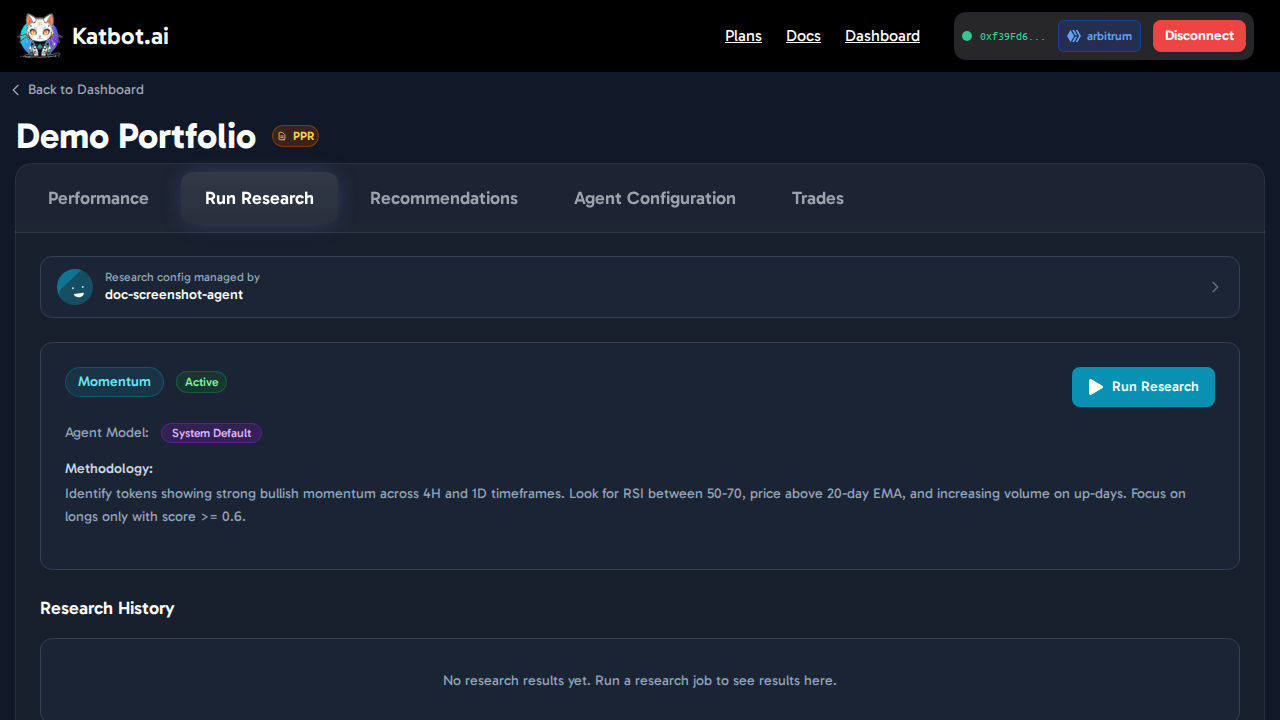
To run research:
- Open the Portfolio Detail page and click the Run Research tab.
- Confirm the active agent and config are shown in the Agent Identity Card.
- Click Run Research
- (Optional) Enter a runtime directive (up to 2000 characters) for one-off focus areas
- Click Start Research
- The UI polls every few seconds; typical run time is 2–10 minutes depending on the token universe size
Results expire after 7 days
Research results are cached for 7 days from when they were generated. After expiry, you should re-run research to get fresh analysis based on current market conditions.
Understanding Research Results
After research completes, you'll see a result card in the Results section showing:
- Bucket name — which signal bucket was analyzed
- Token chips — small badges showing the top tokens proposed
- Summary snippet — a short preview of the AI's findings
- Timestamp & expiry — when it ran and when it expires
Research Detail Panel
Click View on any result card to open the detail panel:
Summary
The AI's narrative analysis in markdown format, explaining its reasoning and key findings.
Token Intelligence
Live-fetched sentiment analysis and news for each proposed token. This data is fetched fresh each time you open the panel.
Proposed Token Set
A ranked list of tokens with: - Score (0.0–1.0) — color-coded confidence: - ≥0.7: green (high confidence) - ≥0.5: yellow (moderate confidence) - <0.5: orange (lower confidence) - Score bar — visual representation of the score - Rationale — why this token was selected - Bucket-specific raw data — underlying metrics for the bucket type
Data Sources & Metadata
Expandable section showing: - Agent tools called during research - Data timestamps - LLM model used
Applying Tokens to Your Portfolio
Once you've reviewed a research result, you can apply the proposed tokens to your portfolio:
- Review the proposed tokens in the detail panel
- Use checkboxes to select/deselect individual tokens
- Click Apply N Tokens to Portfolio (where N is the number of selected tokens)
- Confirm in the dialog that appears
- Click Apply
Applying replaces your current token list
Applying a research result replaces the portfolio's existing token list entirely. If you want to preserve your current tokens, note them down before applying.
Tips for Effective Methodology Prompts
Crafting good methodology prompts is key to getting useful research results:
Be Bucket-Specific
Align your prompt language to the signals available for that bucket. For example: - MOMENTUM: Ask about multi-timeframe price action, RSI levels, moving average crossovers - VOLUME_BREAKOUT: Request volume spikes relative to rolling averages, liquidity thresholds - WHALE_ACTIVITY: Specify position size thresholds you consider "whale-sized" - SECTOR_ROTATION: Ask for sector performance comparisons and rotation patterns
Specify Direction
Tell the agent whether you're interested in longs, shorts, or both: - "Focus on long setups with strong bullish momentum" - "Identify both long and short opportunities across all buckets"
Set Score Thresholds
Filter by confidence level: - "Only include tokens where score >= 0.7" - "Include moderate-conviction plays (score >= 0.5) for diversification"
Use Runtime Directives for Time-Sensitive Focus
Keep your methodology prompt time-insensitive, then use runtime directives for event-specific focus: - Methodology: General criteria for token selection - Runtime directive: "Focus on tokens reacting to today's CPI announcement" or "Exclude tokens with negative news from the past 24 hours"
Require Volume Support
For technical buckets like MOMENTUM or VOLUME_BREAKOUT, require minimum volume to avoid low-liquidity tokens: - "Only include tokens with at least $1M daily volume"
Example Prompts
MOMENTUM:
"Identify tokens showing strong bullish momentum across 4H and 1D timeframes. Look for RSI between 50-70, price above 20-day EMA, and increasing volume on up-days. Focus on longs only with score >= 0.6."
VOLUME_BREAKOUT:
"Find tokens with volume spikes exceeding 2x their 7-day rolling average. Require minimum $2M daily volume and positive price change. Include both long and short signals."
WHALE_ACTIVITY:
"Detect tokens with large position changes (>5% of open interest) in the past 6 hours. Focus on accumulation patterns for longs, distribution for shorts. Minimum score 0.65."
SECTOR_ROTATION:
"Identify outperforming sectors (L1, DeFi, AI, Gaming) relative to BTC over 24H. Suggest top tokens from hot sectors with strong relative strength. Include both directions."
Relationship to the Broader Agentic Workflow
Research requires a primary agent assigned to the portfolio with an active research config. The research-selected token set becomes the universe from which your agent draws when generating recommendations.
The 7-day expiry on results creates a natural refresh cadence — re-run research weekly or before major market events to keep your token set current.
Next steps: → Creating Agents | → Managing Portfolios | → Getting Recommendations