Using the Katbot Trading Skill with OpenClaw

This guide shows you how to install the Katbot Trading Skill from ClawHub into your OpenClaw agent, complete first-time onboarding, and start getting AI-powered trade recommendations on Hyperliquid — all from natural conversation.
NEED OPENCLAW?
- Get VPS/cloud “1-click” openclaw on Hostinger for 20% Off with Coupon code: KATBOTAI
- Or install OpenClaw on your own server or local machine: OpenClaw Installation Documents
⚠️ Risk Disclosure — Read Before You Proceed
Live trading with AI agents carries financial risk.
- Cryptocurrency markets are highly volatile. Prices can move against your position rapidly and without warning.
- AI-generated recommendations are not financial advice. They are based on quantitative signals and may be wrong.
- Automated trade execution means orders can be placed and filled faster than you can intervene.
- Katbot and its operators accept no responsibility for trade losses, missed opportunities, or errors resulting from the use of this skill or the Katbot API. You trade at your own risk.
You must read and agree to the Katbot Terms and Conditions before using this skill for live trading.
Start on testnet. Never risk more than you can afford to lose entirely.
What the Katbot Trading Skill Does
Allows you connect you OpenClaw agent to the Katbot API, enabling AI-powered trade recommendations and execution on Hyperliquid. This alos gives you a conversational interface to monitor your portfolio and market conditions using you favorite messaging client (for example telegram).
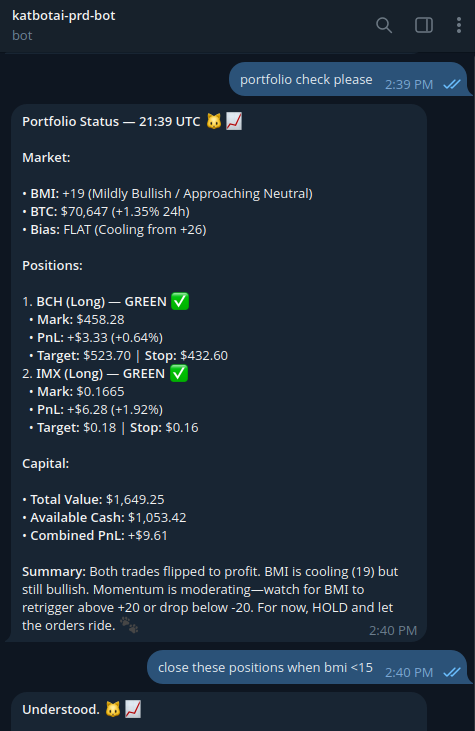
Once installed, your OpenClaw agent can:
| Capability | Description |
|---|---|
| Market analysis | Check the BTC Momentum Index (BMI) and top movers |
| Token selection | Pick the best trading candidates based on market direction |
| AI recommendations | Get trade setups with entry, take-profit, stop-loss, and leverage |
| Trade execution | Place live orders on Hyperliquid — always with your approval |
| Position monitoring | Track open trades, P&L, and portfolio health |
| Portfolio management | View balances, positions, and cash |
Prerequisites
| Requirement | Notes |
|---|---|
| OpenClaw | Installed and running |
| MetaMask | With ETH on Arbitrum (for SIWE authentication) |
| Katbot account | Whitelisted — currently pre-alpha |
| Hyperliquid account | Testnet or Mainnet |
Step 1: Install the Skill from ClawHub
- Open OpenClaw
- Go to Skills → Add Skill
- Search for "katbot-trading" or use the direct link: clawhub.ai/claytantor/katbot-trading
- Click Install
The skill installs to ~/.openclaw/workspace/katbot-trading/.
OpenClaw will automatically run the environment setup on first install. To run it manually:
bash ~/.openclaw/workspace/katbot-trading/tools/ensure_env.sh \
  ~/.openclaw/workspace/katbot-trading
Step 2: Run the Onboarding Wizard
The onboarding wizard walks you through authentication and portfolio setup in one session.
python3 ~/.openclaw/workspace/katbot-trading/tools/katbot_onboard.py
The wizard will:
2a. Authenticate with your Ethereum wallet (SIWE)
- Prompts for your MetaMask private key (hidden input — never stored on disk)
- Signs a login message locally using Sign-In With Ethereum (SIWE)
- Only the signature is sent to
api.katbot.ai— your private key never leaves your machine - Saves access and refresh tokens to
~/.openclaw/workspace/katbot-identity/
⚠️ Never export your MetaMask private key to your shell profile or commit it to any file.
2b. Create or select a Hyperliquid portfolio
- If this is your first time: creates a new portfolio and generates a unique agent wallet
- If you have existing portfolios: lets you choose one
The agent wallet is a separate Ethereum wallet used only to sign trades. It cannot access your main MetaMask funds.
⚠️ The agent private key is shown once during portfolio creation. Copy it immediately — it is saved to
~/.openclaw/workspace/katbot-identity/katbot_secrets.json(chmod 600).
2c. What gets saved
| File | Contents | Permissions |
|---|---|---|
katbot_config.json |
Portfolio ID, wallet address, API URL | readable |
katbot_token.json |
Session token (auto-refreshes) | 600 |
katbot_secrets.json |
Agent private key | 600 |
Step 3: Authorize the Agent Wallet on Hyperliquid
Katbot executes trades using the agent wallet. You must grant it trading permission on Hyperliquid:
- Copy the agent wallet address printed at the end of onboarding
- Go to app.hyperliquid.xyz → Settings → API
- Click Add API Wallet
- Paste the agent wallet address
- Enable Trading permission
- Set expiration to 180 days
- Confirm the MetaMask transaction
See the Hyperliquid Integration Guide for screenshots.
Your agent now has permission to trade on your behalf.
Step 4: Talk to Your Agent
Start OpenClaw and talk naturally. The skill handles the full workflow automatically.
Example session
You: "What's the market looking like today?"

Agent: Checking BMI and top movers...
BTC Momentum Index: +22 (BULLISH)
Top 24h gainers on Hyperliquid: SOL +8.2%, AVAX +6.1%, NEAR +5.4%
The market is showing bullish momentum. Want me to get a trade recommendation?

You: "Yes, give me a recommendation."

Agent: Requesting recommendation... (polling)
Recommendation ready:
  Action: LONG SOL
  Entry: $195.50
  Take Profit: $210.75 (+7.8%)
  Stop Loss: $180.25 (-7.8%)
  Leverage: 3x
  Position size: $2,000
  Confidence: HIGH
  R/R ratio: 1:1

Want to execute this trade? (yes/no)

You: "Yes"

Agent: ⚠️ Confirming: This will place a LONG on SOL for $2,000 at 3x leverage.
Max loss if stop is hit: ~$460. Confirm? (yes/no)

You: "Yes"

Agent: ✅ Trade executed. Order ID: 0x12ab3c...
Position open. I'll monitor it for you.
Common Phrases
Talk to your agent naturally. Here are phrases that trigger the skill:
Portfolio: - "What's my current P&L?" - "Show me open positions" - "How much cash do I have?"
Market: - "Check the momentum index" - "What tokens are trending?" - "Is the market bullish or bearish?"
Trading: - "Give me a recommendation" - "Execute the recommendation" - "Close my SOL position" - "Get me a bearish recommendation"
Help: - "What can you do?" - "Explain the recommendation"
How the Workflow Works
You (chat) → OpenClaw Agent → https://api.katbot.ai → Hyperliquid
BTC Momentum Index (BMI) — When to Trade
The BMI tells the agent whether the market is trending strongly enough to warrant a trade.
| BMI | Signal | Agent Action |
|---|---|---|
| ≥ +15 | BULLISH | Selects top gainers → requests LONG recommendation |
| ≤ -15 | BEARISH | Selects worst performers → requests SHORT recommendation |
| -15 to +15 | NEUTRAL | Exits cleanly. No trade. |
The agent will not request a recommendation in a neutral market — this protects you from low-conviction trades.
Recommendation Workflow
- Check BMI via CoinGecko
- Select tokens — best/worst 24h performers on Hyperliquid
- Request AI analysis — Katbot analyzes technicals, volatility, price history
- Generate trade setup — entry, TP, SL, leverage, position size
- Present to user — you see everything before any order is placed
- Execute only on approval — the agent never auto-trades
Leverage Guidelines
| Market Condition | Recommended Leverage |
|---|---|
| RSI < 20 or > 80 (extreme) | 1x — high reversal risk |
| Clear trend, BMI ±15–30 | 1–2x |
| Strong momentum, BMI ±30+ | 2–5x |
| High volume breakout | Up to 5x |
At 5x leverage, a 5% adverse move = 25% of your margin at risk. Always honour your stops.
Security
katbot-trading is an OpenClaw skill that connects an AI agent to Katbot.ai, a portfolio management service for trading perpetual futures on Hyperliquid. From a security perspective the skill allows an agent to:
- Authenticate with the Katbot API using Sign-In with Ethereum (SIWE).
- Retrieve AI-generated trade recommendations (entry, take-profit, stop-loss, leverage).
- Execute trades on Hyperliquid (requires mandatory explicit user confirmation).
- Monitor open positions and portfolio performance.
The skill does not interact with Hyperliquid directly. All on-chain interactions are delegated to the Katbot API using a scoped agent wallet—rather than the user's primary wallet—to sign and submit transactions.
Architectural Necessity of Credential Handling
The Hyperliquid Agent Wallet Model
Hyperliquid uses an API wallet (agent wallet) system: a separate, limited-scope keypair authorized to trade on behalf of a main wallet.
- Permissions: Trading only; it cannot withdraw funds to external addresses.
- Control: Can be revoked instantly by the user via the Hyperliquid UI.
- Isolation: The main wallet's funds are not directly accessible via this key.
Transmission Logic
Because the Katbot API operates as a server-side execution engine, the agent key must be available to the API at the time of execution to sign the order. This follows the industry-standard model used by platforms like 3Commas or Pionex.
The key is transmitted only during:
POST /agent/recommendation/message(Trade request)POST /portfolio/{id}/execute(Execution)
It is sent via HTTP header (X-Agent-Private-Key) and JSON body. It is never logged, stored in browser state, or included in read-only calls.
MetaMask Wallet Key Security
The WALLET_PRIVATE_KEY is used exclusively for SIWE authentication. Signing happens entirely locally; only the resulting signature is sent to the API. The private key itself is never transmitted over the network and is never persisted to disk.
Implemented Security Mitigations
The following measures address specific feedback from the security review:
- Elimination of Silent Injection: Removed the auto-loading of private keys from
.envfiles intoos.environat import time. - Narrowed File Discovery: Search paths for configuration are now restricted to
~/katbot_client.envor an explicitOPENCLAW_HOMEpath, preventing accidental secret loading from repository trees. - Registry Metadata Cleanup: Removed
WALLET_PRIVATE_KEYfrom required environment variables to prevent users from pre-setting it insecurely. - Filesystem Protections: Secrets are written with Unix file mode
0o600(owner read/write only). - User Consent Mandates: The
SKILL.mdnow requires the agent to present a Credential Transmission Notice and obtain affirmative user confirmation before any sensitive operations. - Agent Logic Constraints: Enumerated rules prevent the AI from logging keys, creating
.envfiles, or reading identity directories.
Summary of Credential Behavior
| Credential | Stored where | Transmitted to | When |
|---|---|---|---|
| WALLET_PRIVATE_KEY | Memory only | Never (Signature only) | Onboarding / re-auth |
| AGENT_PRIVATE_KEY | katbot_secrets.json (600) |
api.katbot.ai |
Recommendations & Execution |
| Access Tokens | katbot_token.json (600) |
api.katbot.ai |
All authenticated calls |
Residual Trust Requirement
Users must trust api.katbot.ai with their Hyperliquid agent trading key. This is an explicit, documented trust grant required for server-side automation. Users who do not wish to extend this trust should not install the skill.
Troubleshooting
"Module not found"
bash ~/.openclaw/workspace/katbot-trading/tools/ensure_env.sh \
  ~/.openclaw/workspace/katbot-trading
"401 Unauthorized" — session expired
python3 ~/.openclaw/workspace/katbot-trading/tools/katbot_onboard.py
"Trade won't execute"
- Check the agent wallet is authorized in Hyperliquid Settings → API
- Verify available cash balance ("show me my portfolio")
- On testnet, orderbooks are thin — try BTC or ETH
"Recommendation FAILED" - Check your Katbot subscription includes AI recommendations - Contact support on Discord
"BMI always neutral" BMI is based on BTC 4h momentum. In choppy, sideways markets this is expected — it's working correctly, keeping you out of bad trades.
API Reference
Full interactive docs: https://api.katbot.ai/docs
| Operation | Method | Endpoint |
|---|---|---|
| Get nonce | GET | /get-nonce/{address}?chain_id=42161 |
| Login | POST | /login |
| Verify auth | GET | /me |
| List portfolios | GET | /portfolio |
| Create portfolio | POST | /portfolio |
| Portfolio state | GET | /portfolio/{id} |
| Update tokens | PUT | /portfolio/{id} |
| Request recommendation | POST | /agent/recommendation/message |
| Poll recommendation | GET | /agent/recommendation/poll/{ticket_id} |
| Get recommendation | GET | /portfolio/{id}/recommendation |
| Execute trade | POST | /portfolio/{id}/execute |
| Close position | POST | /portfolio/{id}/close-position |
All requests require Authorization: Bearer {JWT_TOKEN}. Portfolio and trading endpoints also require the X-Agent-Private-Key header.